
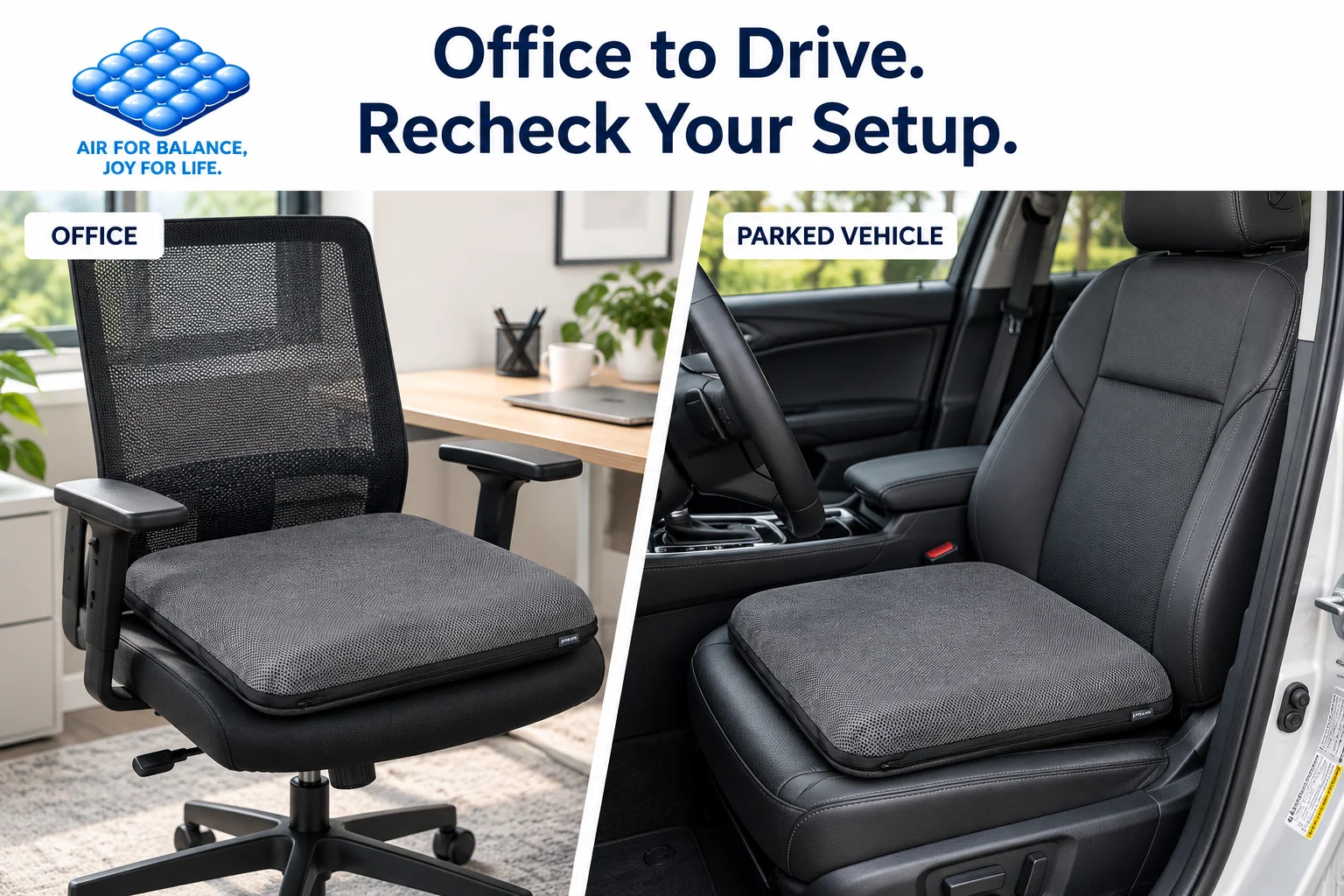
Your workday may start at a desk and end behind the wheel. Carrying a familiar cushion between those seats sounds convenient, but the two setups are not identical.
A seat cushion for office and driving may suit both settings if it fits each seat and does not interfere with normal use. The important step is to reassess placement and sitting position every time you move it.
Adjustable air support gives you a way to change the cushion’s feel. It does not guarantee compatibility with every chair, vehicle, or body.
Why the Same Cushion Can Feel Different
An office chair and a car seat can differ in width, depth, angle, firmness, and side shaping. Their backrests and available adjustments differ, too.
The cushion becomes part of that larger arrangement. A setting that feels balanced at your desk may feel too high, too rounded, or poorly supported in a bucket-style vehicle seat.
Think of portability as the ability to reassess and adapt, rather than permission to copy one setup everywhere.
Start With the Seat Footprint
Measure the usable area where the cushion will rest. Raised sides, armrest supports, and pronounced contours can reduce that space even when the seat looks wide.
The AJ AIR CUSHION flagship measures 45 × 45 × 5 cm, approximately 17.7 × 17.7 × 2 inches before sitting. Compare its width and depth with both seats before deciding to use one cushion in both places.
It should lie evenly without folding, squeezing, bridging large gaps, or relying on unsupported edges. If a seat cannot accommodate it properly, choose another setup. Our seat cushion size guide explains what to measure.
Office and Driving: What Changes?
| Check | At your desk | In a parked vehicle |
|---|---|---|
| Seat fit | Clear space between chair components | Usable space within seat contours |
| Added height | Feet, desk, and armrest relationship | Visibility, headroom, and control reach |
| Backrest contact | Comfortable support while reaching the keyboard | Normal driving position without being pushed forward |
| Stability | Placement during ordinary sitting and standing | Placement while entering and settling into the seat |
| Adjustment | Recheck chair and desk together | Complete all checks before driving |
The checks are related, but the consequences of a poor fit differ. Treat each seat as a separate assessment.
Set Up the Office Chair First
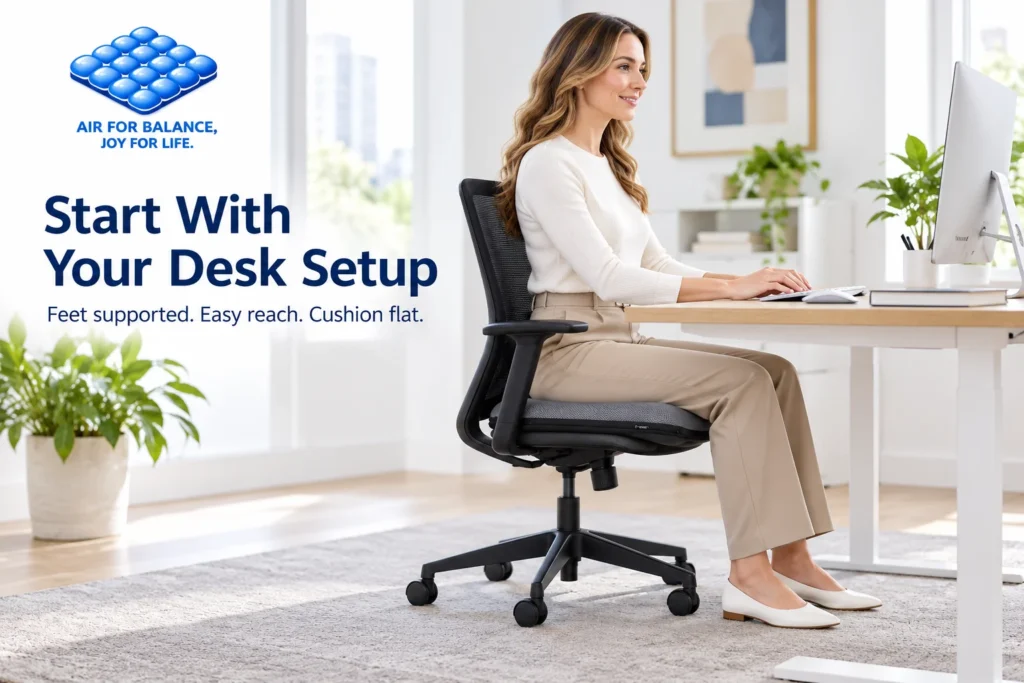
Place the cushion on a clean, dry seat and sit down normally. Then check the complete workstation:
- Your feet have stable support on the floor or a suitable footrest.
- You can use the backrest without being pushed toward the seat edge.
- Frequently used items are within comfortable reach.
- Armrests do not force your shoulders upward or block desk access.
- The cushion stays aligned when you change position or stand.
OSHA’s computer workstation chair guidance emphasizes supported feet and adjusting the chair with the workstation. This is general setup guidance, not an endorsement of a particular cushion.
An accessory may change seat height even when the chair stays at the same setting. Read how a seat cushion changes sitting height if your feet or desk relationship feels different.
Recheck the Vehicle While Safely Parked
Before adding any accessory, consult the vehicle owner’s manual for restrictions involving seats, occupant sensors, and airbag systems. Use the cushion only where the vehicle and product instructions permit it.
With the vehicle safely parked, place the cushion flat and reassess your normal driving position. Check pedal reach, steering clearance, headroom, visibility, seat-belt positioning, and access to controls.
Do not use a cushion that interferes with any of these. Do not make air adjustments while driving, and do not assume that a comfortable office setup proves vehicle suitability.
Our driving seat cushion page explains the relevant product features and setup checks.

What Adjustable Air Technology Adds
The AJ flagship combines 27 interconnected air cells, built-in press controls, a breathable 3D mesh cover, and a silicone non-slip base.
The air adjustment lets you fine-tune firmness and feel after changing seats. Begin with a modest air level, assess the cushion while seated, and make small changes according to the product instructions.
Maximum inflation is not automatically the best setting. Adding air cannot correct a seat that is too narrow or a position that interferes with normal reach.
The mesh and non-slip base also have limits. Breathable construction does not promise a cool seat in every environment, and surface grip is not a fastening system. Repeated shifting is a reason to reassess fit, placement, and compatibility.
Follow the air seat cushion adjustment guide rather than judging firmness only by pressing the cushion with your hand.
A Simple Routine When Changing Seats
Remove the cushion, check that its cover and base are clean and dry, and carry it without trapping it in doors or seat mechanisms.
At the next seat, repeat the fit and position checks before changing the air level. Make one adjustment at a time so you can identify what changed.
Keep the cushion separate from loose objects underneath it. Follow care and storage instructions, and avoid leaving it in conditions outside the product’s stated limits.
If moving it every day becomes inconvenient, a second cushion may simplify your routine. Each still needs its own setup; owning two does not remove the checks.
Frequently Asked Questions
Can I use the same air level in both seats?
Possibly, but reassess it each time. Seat shape and sitting position can change the feel even when you have not changed the air level.
Does the non-slip base guarantee it will stay still?
No. Grip depends on the surface, placement, and fit. Stop and reassess if movement makes the setup unstable.
Is one cushion suitable for every car and office chair?
No. Compare dimensions, follow the relevant instructions, and check the complete seated position in each setting.
Choose One Cushion Around Two Real Setups
The useful question is not simply whether a cushion is portable. It is whether it works with both seats you actually use.
Explore AJ AIR CUSHION for office seating or compare the flagship seat cushions and check the dimensions against your chair and vehicle before choosing.
AIR FOR BALANCE, JOY FOR LIFE.